


Real Guitar: acoustic electric
4.37.39K Reviews
App Specs
- Version
- 8.38.10
- Updated On
- License
- Free
- Downloads
- 50,000,000+
- Developer
- Kolb Apps
- Categories
- Music
- Platform
- Android, iOS
Screenshots
 Analysis by AppCompare
I find Real Guitar: acoustic electric most useful when I treat it as a compact practice pad rather than a substitute for an instrument. A phone screen can help me explore chord shapes, hear how a progression moves, and pass a few spare minutes making music. It cannot recreate the resistance of strings or the feel of a fretboard, and that distinction matters if you’re deciding what kind of practice you want.
A simple routine makes casual playing more useful
My most reliable approach is to pick one small goal before opening the game: try a chord change, test a short rhythm, or work out the notes of a melody. On a touchscreen, it’s easy to tap around without remembering what sounded good. Keeping the session focused gives me something to repeat and makes the app more useful than unstructured strumming.
For example, if I have a few minutes before heading out, I might choose a familiar progression and play it slowly, concentrating on changing chords cleanly. I can then speed up only when the transition feels comfortable. That routine is not a replacement for learning finger placement on a real guitar, but it is a convenient way to rehearse the order and sound of a progression when an instrument isn’t nearby.
I also like using a virtual guitar as a low-pressure sketchbook. If a musical idea comes to me while I’m waiting, I can test whether a chord sequence has the mood I want without carrying gear. The phone form factor is the clear advantage here: it lowers the effort needed to start. The trade-off is that small touch targets and screen-based playing can make precise, fast parts awkward, especially when I’m trying to hold a chord and pick a separate melody.
Check the setup before settling into a session
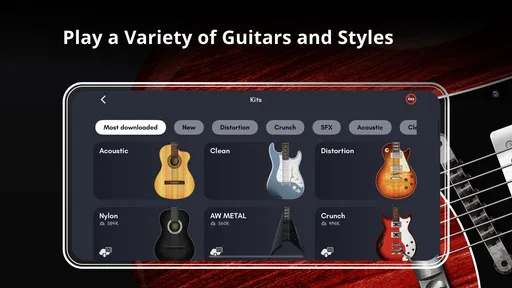
With different guitar sounds and tuning options available, I’d take a moment to choose a setup that suits the exercise instead of switching sounds every few minutes. An acoustic tone can make a simple chord progression easy to hear, while an electric sound may be more satisfying for a riff. If I’m working on a song idea, matching the tuning first helps me avoid practicing a shape that won’t fit the version I want to play.
Alternate tunings are best treated as a deliberate choice, not a novelty button. I’d note which tuning I selected before moving on, particularly if I’m trying several ideas in one sitting. Otherwise, a familiar chord shape may produce an unexpected result and leave me unsure whether the problem is my playing or the setup. This small habit saves time and makes experiments easier to compare.
The guitar’s appearance can be changed too, but I see that as personal decoration rather than a practice advantage. The settings that matter most to me are the ones that affect what I hear and how I play. If you’re new to the app, start with a sound and tuning you understand, then change one thing at a time. That way you can tell what each adjustment actually does for your session.
Worth Reading Before You Choose

Baby Panda World Brings Quick Play to Modern Phones, but Its Game Library Feels Busy

ESPN’s Live Game View Makes Following Close Games Easier

QuizzLand Review: A Good Fit for Short Trivia Breaks, Not Every Player

Basketball Stars: Multiplayer Is Fast, but Can It Recover When Matches Go Wrong?

WEBTOON Turns Phone Updates Into a Better Reading Routine

Link to Windows Runs on Shared Habits, Not Social Feeds
Use repeatable patterns instead of tapping at random
The multi-touch support is more useful when I think in terms of a repeating pattern: hold a chord, strum a steady rhythm, then change to the next chord at a planned point. It gives my hands a simple job and helps me hear whether the transition works. For a melody over chords, I’d keep the line short at first. Trying to play a complicated part while learning the controls can turn a musical idea into a test of touchscreen accuracy.
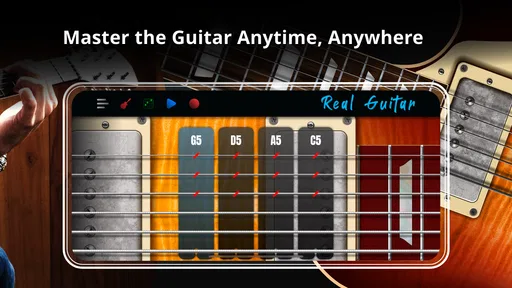
A chord library can help me get unstuck when I know the sound I want but can’t remember the shape. I use it as a reference, then return to the same chord a few times rather than browsing through a long string of options. That makes the library part of a practice loop: look up a chord, play it, connect it to a neighboring chord, and repeat the change until it feels familiar.
Recording can be useful for checking whether a progression sounds as steady as it felt while playing. I’d make a short take, listen back, and choose one thing to adjust—perhaps the timing of a chord change—rather than treating every rough edge as a reason to start over. Playing along with a music file can make practice feel more engaging, but it also adds another thing to coordinate. I’d first learn the part on its own, then bring in the backing track once I know where the changes fall.
First Impressions and User Interface
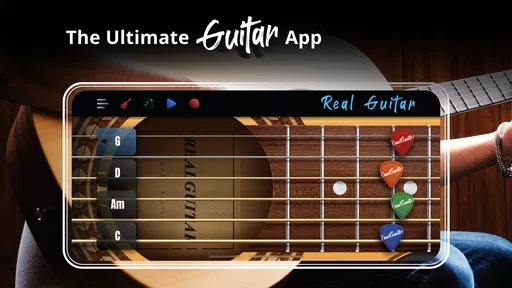
The first thing that struck me when I launched Real Guitar: acoustic electric was its clean and intuitive interface. The app wastes no time in getting you straight to the action. Upon opening, you’re greeted with a choice of acoustic or electric guitar modes, each offering a different set of sounds and styles. For a novice like myself, the simple layout was a dream. Everything is clearly labeled, and the buttons are big enough to hit without fumbling, which is great whether you have nimble fingers or not.
Features That Hit the Right Note
Now, onto the fun part — the features. This app packs quite a punch with its variety of options. You can choose from a range of guitars, each with its own unique sound quality. Whether you’re into the mellow vibes of an acoustic or the rockstar energy of an electric, there’s something for every music lover.
One feature that stood out to me was the multi-touch capability. It allows you to play chords and melodies simultaneously, which makes for a more realistic playing experience. Couple that with the app's multitasking capability, and you can jam out while doing other things on your phone. The sound quality is surprisingly good, and there's even an option to plug in your phone to an amp for a louder sound.
Learning and Playing
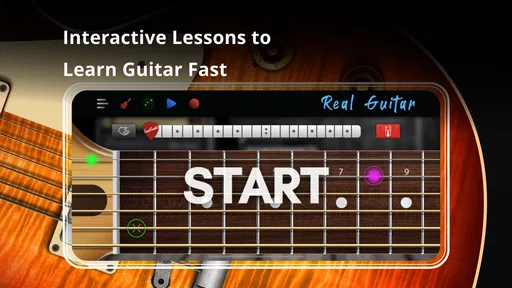
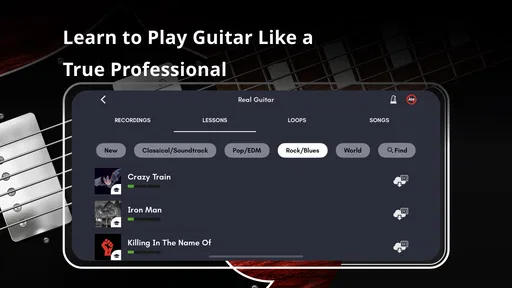
If, like me, you’re not exactly a guitar hero in real life, the app’s tutorial mode is a real lifesaver. It offers step-by-step lessons on how to play different songs and chords, which is perfect for beginners. The lessons are interactive, and the app gives feedback on your performance, helping you to improve as you go. There’s also a handy chord library that includes all the basics, so you can easily look up and practice new chords.
Real Guitar: acoustic electric also allows you to record your sessions, which is a neat feature if you want to track your progress or share your tunes with friends. You can even upload your own music files to play along with, making the app versatile for learners and more experienced players alike.
Customization and Personalization
What I particularly enjoyed was the customization aspect of the app. You can adjust the tuning of the guitar to suit your preferences, and the app supports various tunings, from standard to drop D, and even custom tunings. This flexibility means you can experiment with different styles and genres without being restricted.
The app also lets you customize the look of your guitar. You can change the guitar skin to match your style, which is a fun little touch. It might not affect the sound, but it does make the app feel more personal.
Where a virtual guitar fits—and where it doesn’t
I’d recommend this music game to curious beginners, songwriters who want to audition chord ideas, and guitar players who want a quick way to explore sounds when their instrument isn’t at hand. The Everyone age rating and free entry make it easy to try without committing to a purchase. Kolb Apps has built something approachable, and the 4.3 average from around 382,000 ratings suggests that many players find the format enjoyable. It has passed 50 million installs, but popularity doesn’t make a phone screen behave like strings under your fingers.
That difference is why I wouldn’t choose it as my only learning tool. The app can help me recognize chord sounds and repeat a progression, but it won’t train the pressure, reach, and calluses that a physical guitar requires. A beginner who wants to build those skills should use a real instrument alongside it. Likewise, an experienced guitarist practicing precise picking or expressive bends will get more from an actual guitar, where technique and touch are central rather than simulated.
Compared with music games built around timing challenges, this feels closer to an instrument simulator: I’m choosing what to play, rather than being guided through a rhythm-game track. Compared with a chord-chart app, it offers sound and interaction instead of only reference material. Those are useful distinctions. If you mainly need to look up chord names, a dedicated chart may be quicker; if you want to tap out an idea and hear it immediately, this is the more playful option.
There are practical limits to keep in mind. Playing on a phone can feel cramped, and multi-touch does not remove the need to aim accurately. A tablet may provide more room if you already have one, while headphones can make a short practice session easier to keep to yourself. Connecting a phone to an amp can make the sound louder, as the app allows, but it still won’t provide the feel or response of a physical guitar. I’d also avoid assuming that recording a take automatically makes it a polished demo: it is most useful to me as a way to review a rough idea and notice timing issues.
Small habits that help you get more from it
One useful habit is to separate exploration from practice. When I’m experimenting, I’ll try different sounds or tunings and accept that the result may be messy. When I’m practicing, I’ll keep the setup fixed and repeat a short passage. Switching between those modes intentionally prevents customization from taking over the session and makes it easier to tell whether I’m improving at the part itself.
Another is to use a recording as a checkpoint rather than a performance. A quick take can reveal that a chord change is late or a strum pattern is uneven, details that are easy to miss while concentrating on the screen. I’d record the same short passage again after correcting one issue. That creates a simple comparison without turning the app into a complicated production setup.
If you’re playing along with your own music, find the chord changes first and keep the initial attempt simple. A backing track can mask uncertainty because there is already plenty to hear; starting with a reduced part makes it easier to stay oriented. Once the changes feel clear, add a fuller strum or melody. This approach is especially helpful when the screen is competing with the music for your attention.
What to expect before you install
The game is free to download, with optional in-app purchases priced from $1.99 to $18.99 per item. I’d begin with the free experience and decide whether the available sounds and practice tools suit my routine before spending anything. Its current version is 8.37.5, and it requires Android 7.0 or later on Android. The core appeal is quick access to a playable guitar layout, not a promise that every real-world playing technique will transfer to touch.
For an everyday example, imagine waiting for a friend and trying to remember a progression you heard earlier. I can open the app, test a few chord changes, save a short recording, and return to the idea later. That is a realistic win: no instrument to carry and no need to turn the moment into a formal lesson. If I were preparing for a performance or trying to improve finger technique, I’d take the idea to a real guitar instead.
Final Strum
So, is Real Guitar: acoustic electric worth downloading? I’d say a resounding yes. Whether you're an aspiring musician or just someone looking to have some fun, this app offers a comprehensive and enjoyable guitar-playing experience. With its user-friendly interface, rich features, and educational resources, it’s a fantastic tool for learning and playing music on the go.
While it might not replace the feel of a real guitar in your hands, it certainly provides a convenient and entertaining way to get your guitar fix. Plus, it’s a great way to impress your friends at parties with your newfound skills! So go ahead, give it a try, and you might just discover your inner rockstar.
My verdict is strongest for casual practice, chord exploration, and quick musical sketches. I’d keep it installed if I wanted an easy way to pick up an idea between lessons or while away from my instrument, but I’d pair it with a real guitar for any goal that depends on physical technique. That balance is what makes the app worthwhile: it is a handy musical playground, provided I treat its touchscreen strengths and limits honestly.
Pros
- User-friendly interface for beginners.
- High-quality sound reproduction.
- Variety of guitar types available.
- Customizable chord sets.
- Offline mode for practice anywhere.
Cons
- Ads can be intrusive during use.
- Limited features in free version.
- Requires device with good audio output.
- Some features need internet access.
- Occasional lag on older devices.
FAQs for Real Guitar: acoustic electric
What features does Real Guitar: Acoustic Electric offer?
Real Guitar: Acoustic Electric provides a comprehensive experience for both beginners and seasoned guitarists. It features a wide range of guitar types, including acoustic, electric, and classic. The app offers tutorials, chord libraries, and backing tracks to enhance your practice sessions. Additionally, the app supports both right and left-handed players.
Is Real Guitar suitable for beginners?
Yes, Real Guitar is designed to cater to users of all skill levels, including beginners. The app includes detailed tutorials and an intuitive interface that guides new players through the basics of guitar playing. Beginners can learn chords, scales, and strumming patterns at their own pace, making it an excellent learning tool.
Does Real Guitar require an internet connection to function?
While Real Guitar can be used offline for playing and practicing, some features may require an internet connection. Accessing certain tutorials, backing tracks, and updates might need connectivity. However, the core functions such as playing and practicing chords are available without an internet connection.
Are there any in-app purchases in Real Guitar?
Real Guitar offers a variety of free features; however, it also includes optional in-app purchases. These purchases can unlock additional guitar types, premium backing tracks, and advanced tutorials. While not necessary for basic use, these purchases enhance the overall experience, especially for those looking to dive deeper into guitar playing.
Can I record and share my sessions in Real Guitar?
Yes, Real Guitar includes a recording feature that allows you to capture your practice sessions or performances. You can save these recordings within the app and share them with friends or on social media platforms. This feature is particularly useful for tracking your progress or showcasing your skills.


